
WiBa Connect!1.0.7 - Google Play
You'll be able to see results in few seconds.
Publisher Description


WiBa Connect!
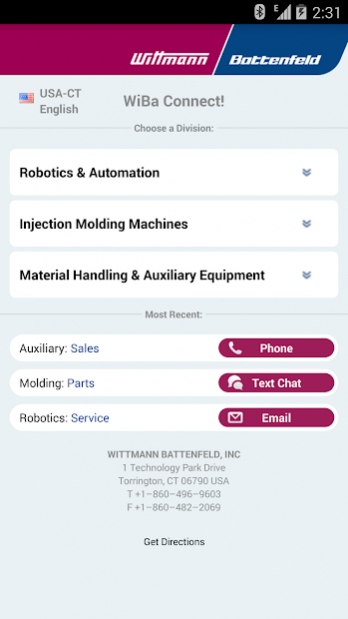
WITTMANN BATTENFELD is always committed to providing the best experience possible to our customers. With WiBa Connect!, we’ve made staying in touch with Wittmann Battenfeld easier than ever. WiBa Connect! is an easy 3-in-1 communicator so you can reach us when you need us. Email, phone or live chat is available at a tap of a button 24/7!
**Current app for Wittmann Battenfeld plants in NORTH AMERICA ONLY
(Phone and text support only available during normal business hours, EST)
FEATURES
•Choose: Service, Parts, Sales Departments, or Customer Feedback in any division (Material Handling & Auxiliary Equipment, Robotics & Automation, Injection Molding Machines)
•Connect: Single-button communication via real-time chat, email, or telephone
•Redial: Your 3 most recent communications from the home screen
•Maps: Directions to our affiliated plants
WiBa Connect! is also available free of charge on other platforms.
About Wittmann Battenfeld
As a worldwide manufacturer Wittmann Battenfeld offers a complete range of innovative peripheral equipment to the global plastics industry. The product range includes robots and automation systems as well as products for automated material supply and drying, the recycling of plastic parts and mold heating and cooling.
About WiBa Connect!
The company that develops WiBa Connect! is Wittmann-Battenfeld Inc.. The latest version released by its developer is 1.0.7.
To install WiBa Connect! on your Android device, just click the green Continue To App button above to start the installation process. The app is listed on our website since 2014-04-15 and was downloaded 0 times. We have already checked if the download link is safe, however for your own protection we recommend that you scan the downloaded app with your antivirus. Your antivirus may detect the WiBa Connect! as malware as malware if the download link to com.trueinteraction.wibacustomerservice is broken.
How to install WiBa Connect! on your Android device:
- Click on the Continue To App button on our website. This will redirect you to Google Play.
- Once the WiBa Connect! is shown in the Google Play listing of your Android device, you can start its download and installation. Tap on the Install button located below the search bar and to the right of the app icon.
- A pop-up window with the permissions required by WiBa Connect! will be shown. Click on Accept to continue the process.
- WiBa Connect! will be downloaded onto your device, displaying a progress. Once the download completes, the installation will start and you'll get a notification after the installation is finished.
Program Details
System requirements
Download information
Pricing
Version History
version 1.0.7
posted on 2014-04-15
- 1.0.7,Fixed returning back to an existing chat after more than one is open.,- 1.0.6,Fixed some UI issues with the text chat system for smaller screens,Fixed reconnection related issues with the text chat server,- 1.0.4,Fixed a crash related to receiving chat messages when the chat window isn't active.,- 1.0.3,Fixed a couple of connection related issues.
Disclaimer
Official Google Play Link
We do not host WiBa Connect! on our servers. We did not scan it for viruses, adware, spyware or other type of malware. This app is hosted by Google and passed their terms and conditions to be listed there. We recommend caution when installing it.
The Google Play link for WiBa Connect! is provided to you by apps112.com without any warranties, representations or guarantees of any kind, so access it at your own risk.
If you have questions regarding this particular app contact the publisher directly. For questions about the functionalities of apps112.com contact us.
